
Apple iPad 11-Inch A16 Review: A Versatile 256GB Tablet for Everyday Use
The Apple iPad 11-inch with the A16 chip combines strong everyday performance, a sharp Liquid Retina display, 256GB of storage, Wi-Fi 6 connectivity, Touch ID, USB-C, and 12MP front and rear cameras. This review examines its features, practical performance, usability, and trade-offs for students, families, professionals, and general tablet users.

Apple iPad 11-inch: A16 chip, 11-inch Model, Liquid Retina Display, 256GB, Wi-Fi 6, 12MP Front/12MP Back Camera, Touch ID, All-Day Battery Life — Blue
SHOP NOW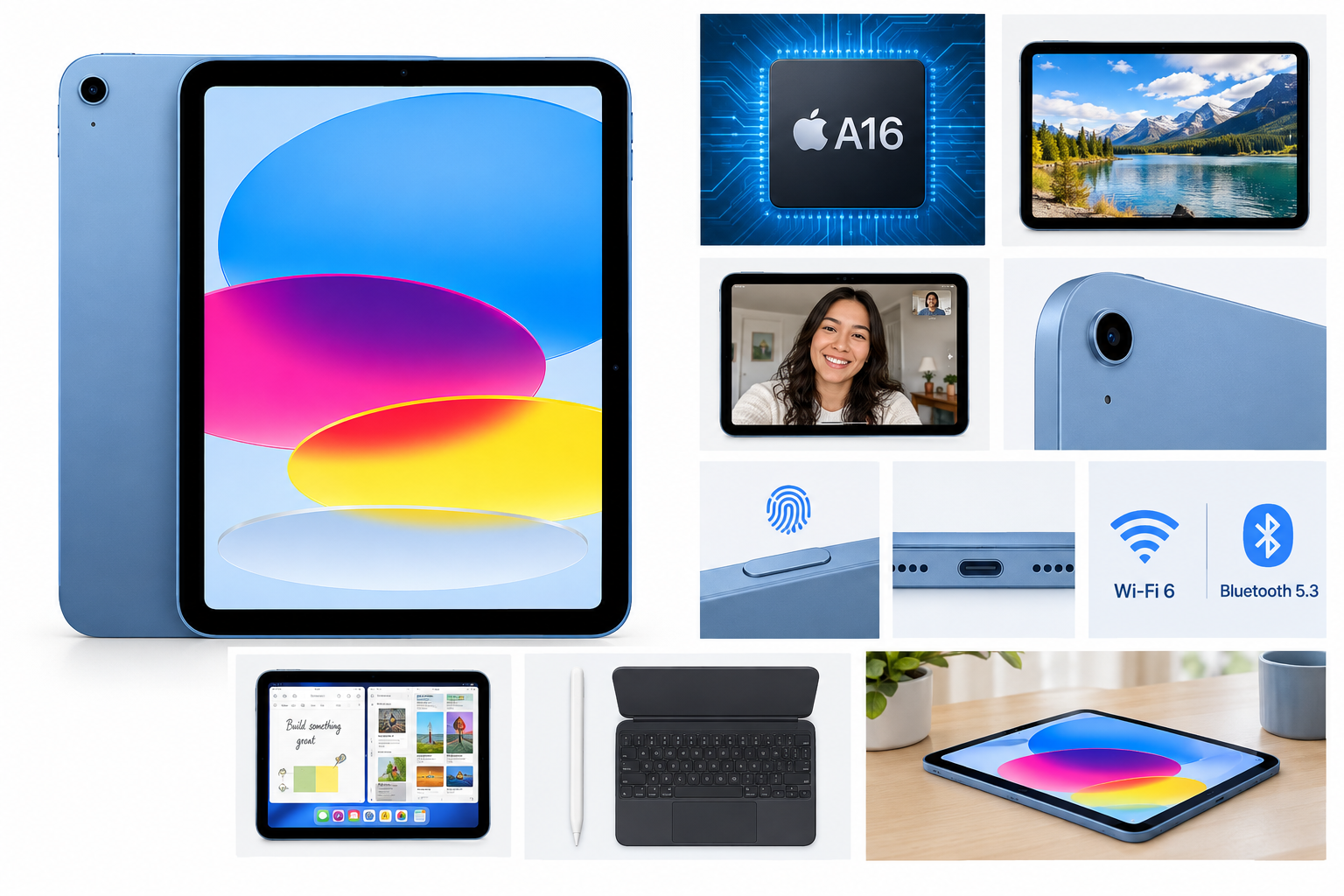
Product Context
The Apple iPad 11-inch with A16 chip, 256GB storage, and Wi-Fi 6 is designed as a versatile everyday tablet. It targets users who want a larger screen than a smartphone, access to the iPadOS app ecosystem, and enough processing power for browsing, streaming, note-taking, communication, light creative work, and gaming.
This blue Wi-Fi model includes 256GB of storage, an 11-inch Liquid Retina display, Touch ID, a USB-C port, and 12MP cameras on both the front and rear. Its combination of performance and portability makes it suitable for home use, education, travel, and general productivity.
Feature Breakdown
A16 Chip and Storage
The A16 chip gives the iPad a modern performance foundation for everyday applications. It is well suited to multitasking, web browsing, video playback, document editing, photo management, and many games. The 256GB storage capacity provides useful room for applications, downloaded media, documents, photos, and other files.
11-Inch Liquid Retina Display
The 11-inch Liquid Retina display offers a 2360-by-1640 resolution at 264 pixels per inch. Text, images, video, and app interfaces should appear detailed and clear, while the larger panel provides a comfortable workspace for reading, drawing, viewing presentations, or watching content.
True Tone adjusts the display’s color temperature to the surrounding lighting. This can make extended viewing more comfortable and helps the screen look more natural in different environments.
Cameras and Center Stage
The iPad includes a 12MP Center Stage front camera for video calls and a 12MP Wide rear camera for photographs, document scanning, video recording, and augmented-reality applications. Center Stage is particularly useful during calls because it can help keep the user framed while moving within the camera’s view.
Wi-Fi 6 and Bluetooth 5.3
Wi-Fi 6 provides modern wireless connectivity for streaming, cloud services, downloads, and online communication. Bluetooth 5.3 supports compatible wireless accessories such as keyboards, headphones, speakers, and controllers.
Touch ID and USB-C
Touch ID is integrated into the top button and can be used to unlock the iPad, authenticate within supported apps, and authorize purchases. The USB-C port supports charging, DisplayPort output, and USB 2.0 data transfer. The tablet can also connect to a compatible external display using the appropriate setup.
iPadOS and Accessories
iPadOS supports split-screen workflows, multitasking, handwriting features, file management, and a broad selection of tablet-optimized applications. The iPad is compatible with Apple Pencil USB-C and the Magic Keyboard Folio, although these accessories are separate purchases.
Performance Insights
The A16 chip should provide responsive performance for common tablet workloads and demanding applications that are appropriate for the standard iPad lineup. App launches, browsing, media playback, and switching between several everyday applications should feel smooth for most users.
The 256GB capacity is an important advantage for people who store large photo libraries, offline videos, games, school materials, or work documents locally. It also reduces the need to manage storage as frequently as a lower-capacity configuration.
For video calls, the landscape-oriented 12MP Center Stage camera is a practical feature. It is better aligned with how many people position a tablet during meetings or classes than a traditionally centered portrait camera.
The iPad is also capable of supporting creative and productivity workflows. With a compatible stylus, it can be used for handwritten notes, drawing, PDF annotation, and marking up documents. With a keyboard accessory, it can handle email, web-based work, and document editing more comfortably.
Usability
The iPad’s interface is straightforward for users familiar with Apple devices, while the App Store provides access to a wide range of applications for education, communication, entertainment, creativity, and productivity. Touch ID offers a convenient alternative to entering a passcode repeatedly.
The 11-inch size provides a useful balance between portability and workspace. It is large enough for split-screen use and comfortable media viewing but remains easier to carry than a full-size laptop. The blue finish gives the tablet a distinctive appearance without changing its core functionality.
All-day battery life is intended to support extended everyday use, although actual endurance depends on brightness, wireless activity, gaming, video playback, and application usage. The USB-C connection also makes charging and connecting compatible accessories convenient.
Trade-offs
The standard iPad design is versatile, but users seeking advanced professional features may want to consider whether it meets their specific requirements. The USB-C port supports USB 2.0 data speeds, which may feel limited for users frequently transferring very large files.
The display is well suited to general use, reading, streaming, and drawing, but the product is positioned as an everyday iPad rather than a specialized professional creative tablet. Users who need advanced display technologies, higher-end graphics performance, or a more extensive accessory setup may require a different class of device.
The Wi-Fi-only configuration is best suited to locations with reliable wireless networks. Users who regularly work away from Wi-Fi may prefer a cellular-enabled tablet, but that is a different configuration from this model.
Accessories such as Apple Pencil and the Magic Keyboard Folio expand the iPad’s capabilities but are not included with the tablet. Buyers who intend to use it as a note-taking or laptop-style device should account for the additional hardware required.
Conclusion
The Apple iPad 11-inch with the A16 chip is a well-rounded tablet for users who want dependable performance, a detailed 11-inch display, generous 256GB storage, modern Wi-Fi connectivity, capable cameras, and the flexibility of iPadOS. Touch ID, USB-C, Center Stage, and compatibility with Apple Pencil and Magic Keyboard Folio further broaden its usefulness.
Its strongest qualities are its balanced size, capable processor, ample storage, and broad range of everyday applications. The main considerations are the USB 2.0 data limitation, reliance on Wi-Fi in this configuration, and the separate cost of productivity accessories. For general tablet use, education, streaming, communication, and moderate creative work, this iPad offers a practical and adaptable experience.